

Recently we had a look at a system from another era of computing, an IBM iSeries, which is still used as part of production environments to this day.
While IBM i itself is extensively documented from an administrative and operational perspective, significantly less public information and security research is available on the inner workings and attack surface of some of its proprietary services and protocols. This makes vulnerability research quite different from a typical web application penetration test.
In this post, we will describe how we used a modern approach to discover vulnerabilities and misconfiguration in a 30-year-old system with the help of AI.
What is iSeries / AS/400?
The IBM Application System/400 or AS/400, later named eServer iSeries or just iSeries, describes midrange computers manufactured by IBM, which were introduced in the late 1980s and were commonly used by businesses during the 1990s. It runs the operating system OS/400, later named i5/OS and then IBM i, which is developed by IBM and uses its own control language. The filesystem is comparable to Unix systems and should look familiar to most people.
Many businesses still use these systems today, often in critical environments with highly sensitive data, which means they must meet modern security standards.
More about the history of the AS/400 is detailed by IBM as part of their IBM Heritage articles.
Attacking Perspectives
We chose to analyze the IBM iSeries system from different perspectives to discover different vulnerabilities. Sometimes it is easier to discover vulnerabilities with broad access, so we also performed a host-based review to gain a better understanding of the system.
Afterwards we shifted the perspective to an attacker with limited access, similar to that of a regular user who might require access to some but not all provided network services.
One of those is the widely used terminal, which can be accessed by users through a 5250 terminal emulator. Typically software such as the IBM i Access Client Solutions is used to connect to the iSeries and its console via the 5250 terminal emulator. Usually users can access custom applications through the terminal, which only provide a very limited attack surface.
Our goal was to discover different ways in which users could abuse their limited access to gain a deeper foothold in the system, possibly gaining administrative-level access.
Existing Research and Toolkits
Before we looked into building a testing environment from scratch, we did some research on existing tools and common attacks against IBM iSeries. Unfortunately, not many offensive security tools existed that could be used out of the box. Oftentimes, research shows the exploitation of custom programs, which can be helpful, but usually it is only relevant to the specific program.
The table below summarizes some of the references we evaluated, categorized into public research (blog posts) and existing tools.
| Reference | Category | Summary |
|---|---|---|
| Simple IBM i (AS/400) hacking | Blogpost | Showcase of vulnerabilities in custom programs and privilege escalation through misconfigurations. |
| Hack the legacy! IBM i (aka AS/400) revealed. | Presentation | Privilege Escalation demo and password security showcase. |
| AS/400 for pentesters | Presentation | |
|
Hacking IBM AS/400 in 2024: QShell and Remote Code Execution |
Blogpost | Showcase of Abusing Remote Command interface, using the hack400tool. |
| hack400tool | Toolkit | security handling tools for IBM Power Systems (formerly known as AS/400). |
At the end of this post, we will show how we used AI to build easy-to-use tools, which can be used to get command execution, filesystem access and more.
Penetration Testing Methodology
With the publicly available information about IBM iSeries, our research on existing tools and common attacks against iSeries, and our own experience in the offensive security field, we defined the following high-level methodology for this assessment. For each category, we also defined questions that should be answered during the assessment:
| Category | Questions to answer |
|---|---|
| Attack Surface Detection | What services and interfaces does the system use? |
| Transport Encryption | Is it possible to intercept/modify transmitted data? |
| Authentication, Authorisation, and Session | How do users authenticate against the system? Are there unauthenticated services? |
| Application Logic | Can the custom programs be exploited for misuse? |
| Information Disclosure | Is any sensitive information exposed to an attacker? |
| Input Validation and Data Sanitisation | Are the programs vulnerable to injection or other input validation attacks? |
| Configuration | Do insecure configurations exist which weaken the system? |
Network Infrastructure of iSeries
Before attacking the system, we performed reconnaissance to identify potential targets and obtain a general understanding of the system from the outside.
The following table provides information about existing services and the ports on which they are running.
| Service | Server Name | Port Non-SSL | Port SSL |
|---|---|---|---|
| Server Mapper | as-svrmap | 449 | – |
| License Management | as-central | 8470 | 9470 |
| Database Access | as-database | 8471 | 9471 |
| Data Queues | as-dtaq | 8472 | 9472 |
| IFS Access using Access/Navigator | as-file | 8473 | 9473 |
| Network Printers | as-netprt | 8474 | 9474 |
| Remote Command | as-rmtcmd | 8475 | 9475 |
| Signon Verification | as-signon | 8476 | 9476 |
| Host Connection | as-hostcnn | – | 9480 |
| Telnet (5250 Emulation) | telnet | 23 | 9932 |
| Navigator for i | as-nav | 2004 | 2005 |
| New Navigator for i | as-new-nav | 2002 | 2003 |
| Digital Certificate Manager | as-admin3-http | 2006 | 2007 |
| HTTP Administration | as-admin | 2001 | 2010 |
| DDM/DRDA | DDM/DRDA | 446 | 448 |
| NetServer | netbios > | 137 | – |
| NetServer | netbios > | 139 | – |
| NetServer (CIFS) | CIFS | 445 | – |
| Secure Shell | ssh | 22 | – |
| Service Tools Server | as-sts | 3000 | – |
| HMC 5250 Console | 2300 | 2301 | |
| ACS LAN Console | – | 3001,3002,2300,2323 |
Source: TCP/IP Ports Required for IBM i Access and Related Functions
After running an Nmap scan against the system, we noticed that many of the above-mentioned services were already blocked by firewall rules. Most notably, the HTTP Administration service and other services running on ports 2000-2010 were closed. Ports 9470-9476, however, were all available, while some of their non-SSL counterparts were closed.
The service as-signon on port 9476 is used for authentication and is required for all other services. Before a successful connection to another service can be made, authentication has to be performed against the as-signon service.
In our environment, employees only access the iSeries system through the terminal emulator (5250), which uses the Telnet service on port 992, so it was surprising to us to see many other exposed services, especially those for remote command and database access.
Privilege Escalation via SQL Interface
We already used the software IBM i Access Client Solutions to access some services such as the 5250 console. However, we found no immediate vulnerabilities that would elevate our access, so we turned to other services.
The following screenshot shows the menu of IBM i Access Client Solutions. This is what a regular user would use too.
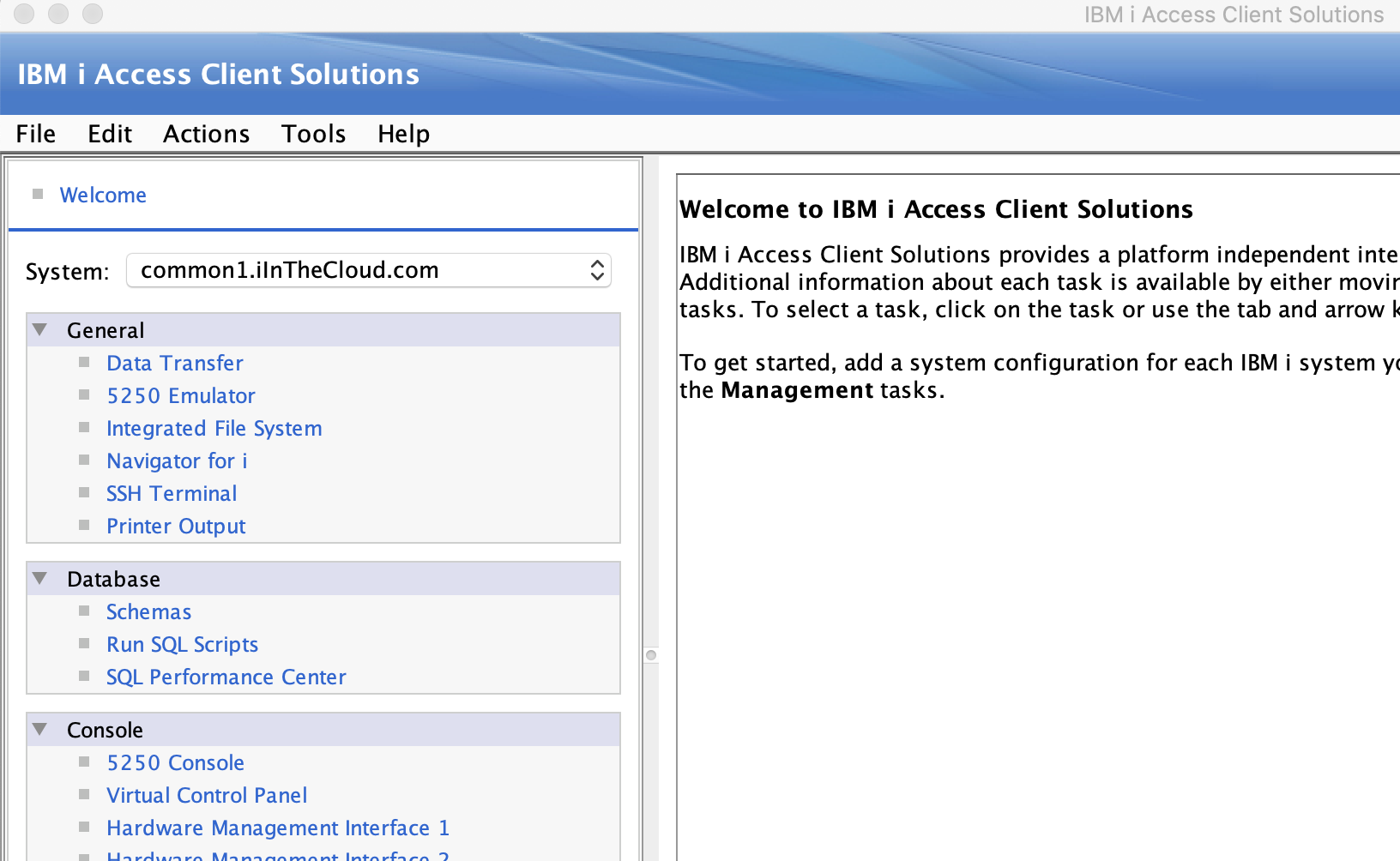
The Database section already provides an easy way to access an SQL interface and execute commands. A simple misconfiguration could lead to low-privileged users being able to connect to the database and execute queries.
We performed basic enumeration to check if we could execute useful routines.
select routine_name, routine_type from qsys2.sysroutines where routine_schema = 'QSYS2' and routine_name in ('QCMDEXC', 'HTTP_GET', 'HTTP_POST', 'SEND_MAIL', 'IFS_WRITE') order by routine_name;
The output confirmed that we were allowed to run the routines HTTP_GET, HTTP_POST and IFS_WRITE. While they can certainly be useful for data extraction or modification of internal files, they didn’t provide us with a lot more access.
Tools with AI for Proprietary Systems
Since only limited public documentation exists or might require significant research to find and analyze, we chose a modern approach by tasking AI to do the heavy lifting for us. We used an AI of our choice to build a tool that can communicate with most of the services listed above, query information, enumerate settings and policies, and provide a way to easily interact with the services without the need to use a fat client.
The AI chose to use the JTOpen implementation, which is an open-source Java Toolbox for IBM. We combined our knowledge and existing findings to suggest features to add to the tool, such as file access through IFS or an automated audit of password policies. After a few adjustments, obvious bug fixes and additions, the tool created by the AI became quite usable and worked pretty well.
Features now include execution of SQL commands, execution of OS commands, file read/write through IFS, listing of scheduled jobs, and enumerating network services, just to name a few. Although it has the ability to retrieve a lot more information about the system, this is not required for most common attacks.
As a first step, let’s enumerate the available services to map the available attack surface.
$ python3 as400enum.py -u ysec -p ysec -j jt400-21.0.6.jar -s 10.0.0.5 --services

[...]
 ══════════════════════════════════════════════════════════════
    HOST SERVER SERVICE AVAILABILITY
  ══════════════════════════════════════════════════════════════
  [i] Authenticated probe mode: cleartext
  [i] Testing 7 Host Server services (both cleartext & SSL)

  SERVICE    CLEAR          SSL            AUTH       DESCRIPTION
  ────────── ────────────── ────────────── ────────── ──────────────────────────────
  central    OPEN:8470      closed         OK         Central Server
  database   OPEN:8471      closed         OK         Database (ODBC/JDBC) Server
  dtaq       OPEN:8472      closed         OK         Data Queue Server
  netprint   OPEN:8473      closed         DENIED     Network Print Server
  file       OPEN:8474      closed         OK         File (IFS) Server
  rmtcmd     OPEN:8475      closed         OK         Remote Command Server
  signon     OPEN:8476      closed         OK         Signon Server

  [i] Cleartext ports open: 7/7
  [i] SSL ports open:       0/7
  [i] Authenticated (cleartext): 6/7
  [!] Only cleartext services exposed — credentials traverse network in the clear.
As we can see all seven application services are available, while authentication was successful on six of them. For an attacker, the services database, file and rmtcmd are a great targets since all of these services can be used for administrative purposes and allow direct access to the system.
For example, an attacker can run any command through the rmtcmd service. While it may not always be available, it is not unrealistic that this service was left open for administrative purposes. The following command is used to check whether the security auditing is enabled on the system or not.
$ python3 as400enum.py -u ysec -p ysec -j jt400-21.0.6.jar -s 10.0.0.5 --rmtcmd-exec "QSH CMD('system DSPSYSVAL QAUDCTL > /tmp/audctl_out.txt')"

[...]
  ══════════════════════════════════════════════════════════════
    REMOTE COMMAND EXECUTION (custom)
  ══════════════════════════════════════════════════════════════
  [i] Running: QSH CMD('system DSPSYSVAL QAUDCTL > /tmp/audctl_out.txt')   [user-supplied]
  [+]   executed OK
Since the rmtcmd service does not provide direct output, the output of the command was saved to a file, which can then be read via IFS.
Less obvious but also interesting entry points are data queues, which can be enumerated by the tool as well. Data queues can contain continuous outputs and could contain valuable information, depending on what the system is used for. First, data queues are enumerated:
$ python3 as400enum.py -u ysec -p ysec -j jt400-21.0.6.jar -s 10.0.0.5 --dtaq --lib QGPL QUSRSYS

[...]
══════════════════════════════════════════════════════════════
    DATA QUEUES
  ══════════════════════════════════════════════════════════════
  [i] Scanning library: QGPL
  [+]   Found 2 DTAQ in QGPL:
    QUEUE        OWNER        CREATED                DESCRIPTION
    ──────────── ──────────── ────────────────────── ──────────────────────────────
    JOBLOGDQ     QPGMR        2024-02-11-09.14.02    Job completion notify queue
    APPMSGQ      APPUSER      2025-06-30-16.42.55    Application event bus queue

  [i] Scanning library: QUSRSYS
  [+]   Found 3 DTAQ in QUSRSYS:
    QUEUE        OWNER        CREATED                DESCRIPTION
    ──────────── ──────────── ────────────────────── ──────────────────────────────
    QZRDSSTQ     QSYS         2018-09-01-00.00.00    (none)
    BATCHSTAT    BATCHSVC     2023-04-18-11.05.33    Batch job status pings
    INTFC_LOG    INTFCUSR     2026-01-07-14.20.09    Interface transaction log

  [i] Total data queues found: 5
If an interesting data queue is found, contents can be peeked at with the following command, in this case showing a completed job along with is timestamp.
$ python3 as400enum.py -u ysec -p ysec -j jt400-21.0.6.jar -s 10.0.0.5 --peek --lib QUSRSYS --queue INTFC_LOG --timeout 5

[...]
══════════════════════════════════════════════════════════════
    DATA QUEUE PEEK: QUSRSYS/INTFC_LOG
  ══════════════════════════════════════════════════════════════
  [i] Peeking at /QSYS.LIB/QUSRSYS.LIB/INTFC_LOG.DTAQ (timeout=5s)...
  [+] Entry received!
  [i]   Sender: INTFCUSR
  [i]   Length: 84 bytes
  [i]   Data  : "TXN=00219341|STATUS=COMPLETE|ACCT=88213|TS=2026-07-27T14:02:10|SRC=EDI_INBOUND_02"
Disclaimer
This tool was developed as a proof of concept for security research and testing purposes. It is not intended to be production-ready and may contain bugs, incomplete functionality, or unexpected behavior. Use it only on systems you own or are explicitly authorized to test. The source code is available at https://github.com/y-security/as400-enumeration-tool.
Conclusion
We wanted to show how tools such as this can be created with minimal resources and within minutes, while manual analysis and research alone can already take hours just to understand the proprietary protocols and interfaces. AI is a great tool for building advanced proofs of concept, especially regarding proprietary systems where almost no or only outdated tooling exists.
Although the AI-built tool provided quick and great results, it is still prone to bugs or logic flaws since it can’t predict how a system will respond. In our case, the AI tried to provide a lot of features by itself, some of which didn’t work right away. With a few tweaks and prompts, it managed to fix most of the obvious errors.
Author

Thore Imhof
thore@y-security.de
Y-Security GmbH
13. October 2026